Gyta BuyBackGyta BuyBack
WordPress + WooCommerce · plugin

The best buyback & trade-in system for WooCommerce stores

Gyta BuyBack turns your WooCommerce store into a buyback machine — run a pure trade-in store, sell and buy back side by side, or let shoppers trade in toward a new purchase. Collect devices, pay customers, and ship it all on autopilot.

  • Run it your way — a full buyback store, sell + trade-in together, or trade-in toward a new purchase
  • Send the money automatically through PayPal or Wise — or pay in store credit with a bonus
  • Quote devices with a condition quiz instead of a variation per condition
  • Prepaid EasyPost labels, QR drop-off codes, or mail a shipping kit
Built on WooCommerce · EasyPost · WordPress.org · Free on WP.org
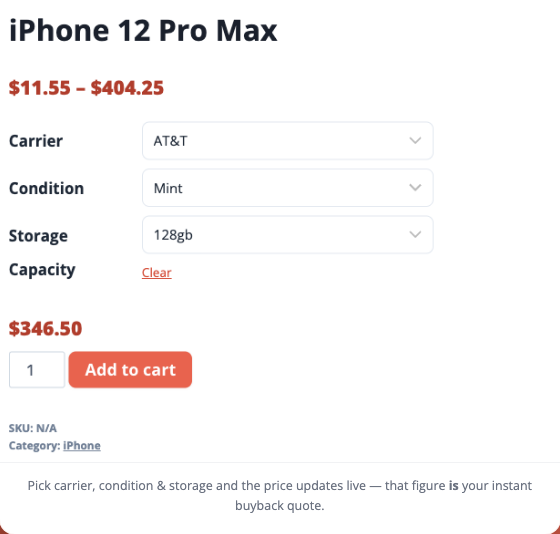
Live demo: instant buyback quote for an iPhone 12 Pro Max — pick carrier, condition and storage and the payout updates live
Works with the stack you already run: WordPressWooCommerceEasyPostPayPal PayoutsWiseTwilio

Normal stores sell. Buyback stores buy.

What is Gyta BuyBack?

A WordPress plugin that extends WooCommerce for trade-in and buyback. Everything runs inside the store you already know — no separate SaaS for the core buyback flow.

How does it work?

Pick a store mode — buyback, sell + trade-in, or trade-in-toward-purchase. Customers hand over their payout details (or apply a device’s value as instant credit), and EasyPost auto-generates the prepaid label so devices land at your door.

Is it secure?

Yes. All your business data stays on your own web server — no "calls home", no backdoors. The only outbound connections are the services you switch on yourself: EasyPost for labels, PayPal or Wise for payouts, Twilio for texts.

How it works

From quote to payout in four steps

A self-guided trade-in flow your customers can complete in minutes.

1

Customer picks a device

They choose what they’re selling, right in your WooCommerce catalog — by variation, or by answering a short condition quiz.

2

They get an instant quote

The offer updates as they answer, holds for however many days you choose, and they enter their payout details at checkout.

3

It ships itself to you

EasyPost generates a prepaid label — plus a QR code for counter drop-off, or a mailed kit if you’d rather send the box.

4

You inspect, and it pays out

Confirm the condition in WP-Admin — or send a revised offer with photos if it arrived different. Then the payout sends itself through PayPal or Wise, while the customer follows every step in My Trade-ins.

New in 1.6

The parts of a buyback business nobody automates — automated

Quoting, shipping, paying and reconciling. These are the jobs that eat your week, and Gyta now does all four for you.

Automatic payouts

Pay customers without logging into PayPal

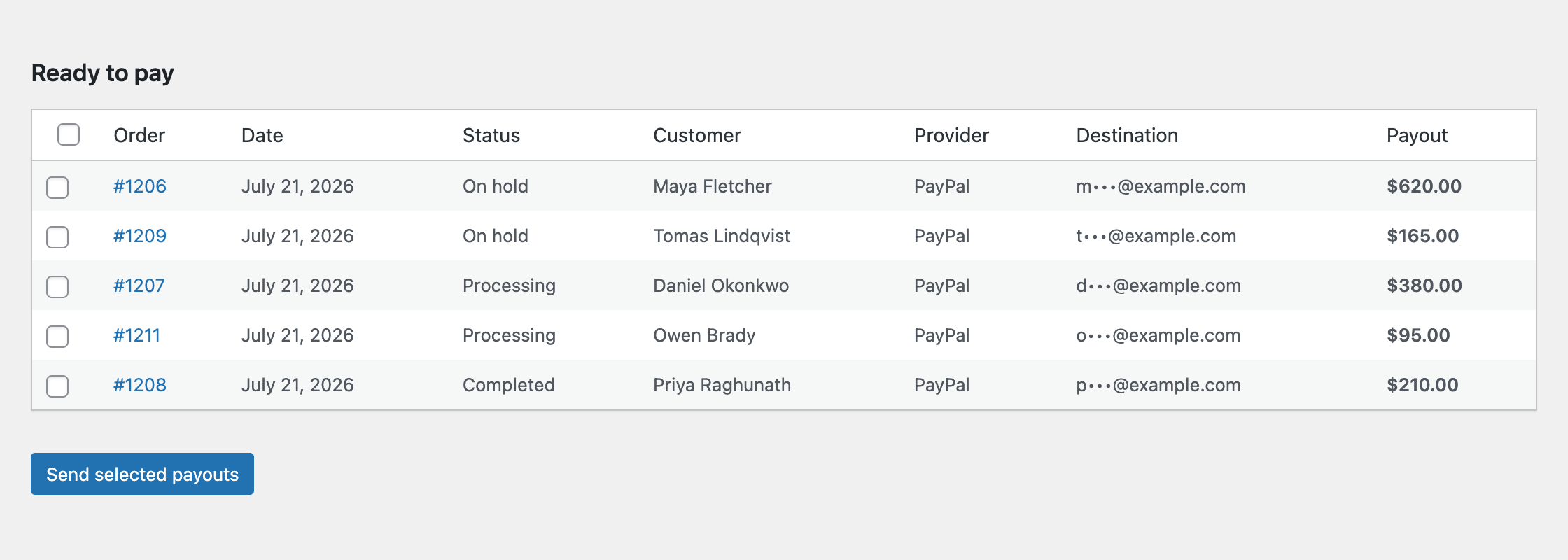
Orders that are ready to be paid collect in a Ready to pay queue. Tick the ones you want, hit send, and the money actually leaves — through PayPal Payouts or Wise, from inside WordPress. Every attempt is written to the order, so you always know what sent, what failed and what you still owe.

  • Batch-send dozens of payouts in one click
  • Sandbox mode to rehearse the whole flow before real money moves
  • CSV export for your bookkeeper
The Ready to pay queue in WordPress, listing five trade-in orders with customer, provider, masked payout destination and amount, and a Send selected payouts button
Payouts → Ready to pay. Destinations are masked in the list; nothing leaves until you send it.
Condition quiz

An instant quote, without a variation per condition

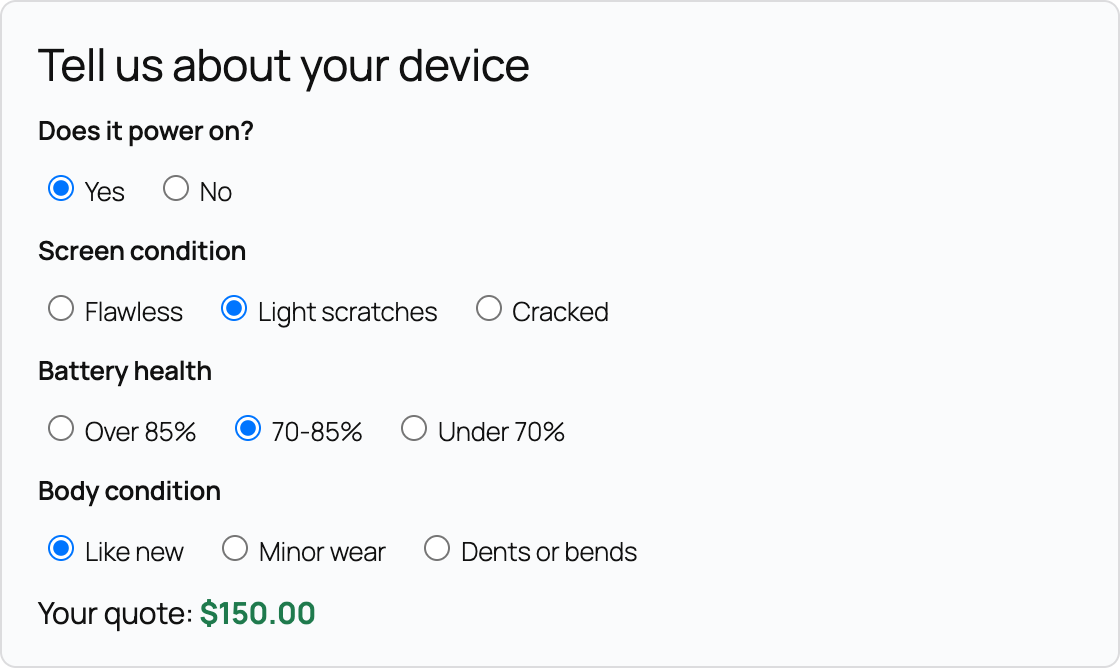
Price the device once — as if it were flawless — then write a few questions. Each answer moves the offer up or down, and the customer watches the number change as they answer. No more maintaining “Good / Fair / Cracked” variations for every model you buy.

  • Percentage or fixed-amount adjustments per answer
  • Any question you like: power, screen, battery, body, accessories
  • The quote recalculates live, then follows the item into the cart
The condition quiz on a product page: questions for power on, screen condition, battery health and body condition, with a live quote of $150.00
The quiz on the product page — four answers in, the offer has settled at $150.
Shipping kits & QR drop-off

Let them mail it back without a printer

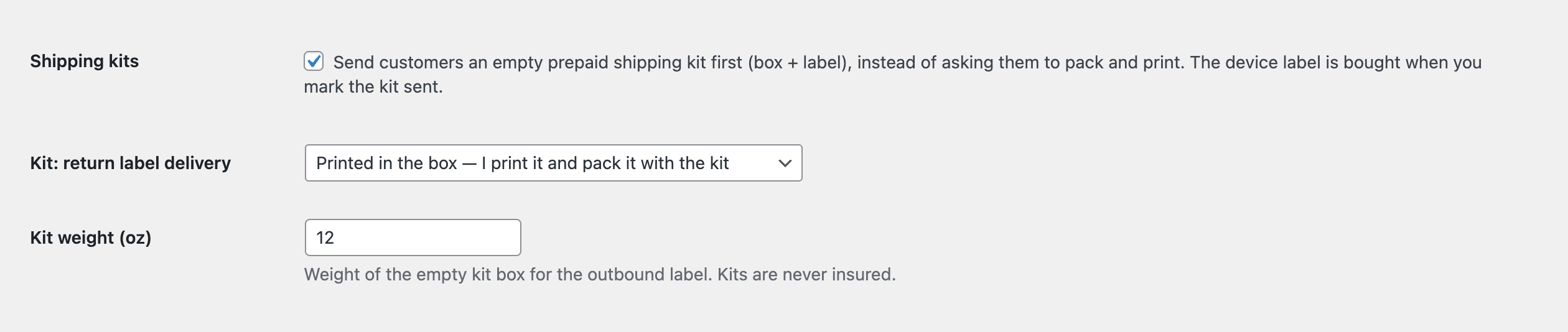
Not everybody owns a printer, and that kills conversions. Send a prepaid kit instead — your store buys an outbound label, mails the box, and buys the device label when you mark the kit sent. Or skip paper entirely: turn on QR drop-off and the customer shows a code at the carrier counter.

  • Kit box weight and return-label delivery are both configurable
  • QR codes issue automatically wherever the carrier supports them
  • The printable label always stays available as a fallback
Gyta BuyBack shipping-kit settings: a checkbox to send customers an empty prepaid kit, a return-label delivery selector, and a kit weight field
Shipping-kit settings, under Shipping → EasyPost Advanced. QR drop-off is a separate checkbox in the same section.
Net settlement & reconciliation

Trade in toward a purchase — and settle up after inspection

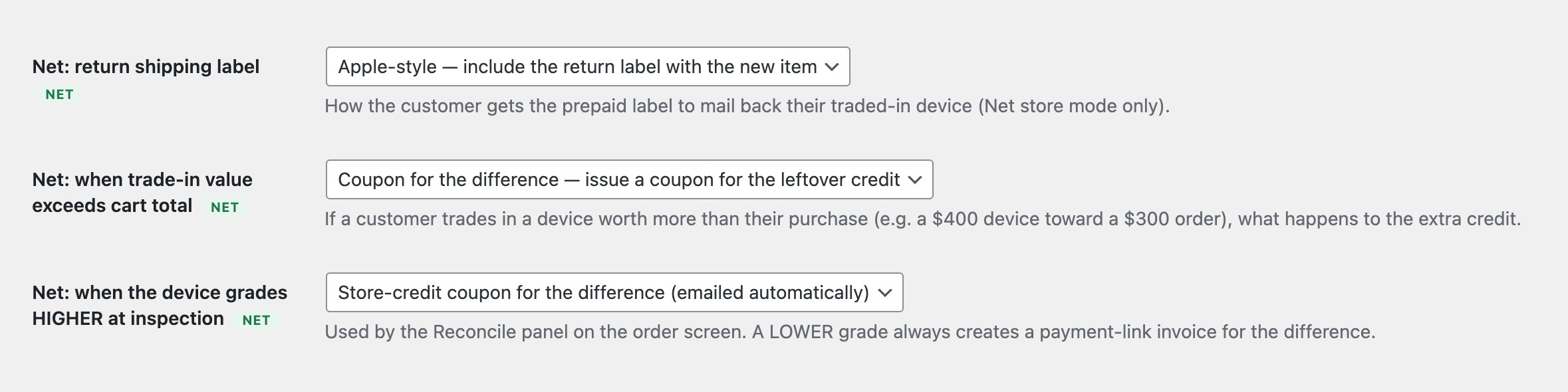
In Net Settlement mode the customer applies a device’s value as credit at checkout and pays only the difference, Apple-style. When the device lands on your bench and grades differently than they described, the Reconcile panel settles the gap for you: a store-credit coupon if it grades higher, a payment-link invoice if it grades lower.

  • Trade-in credit shown live in classic and block checkout
  • Return label bundled with the outgoing order, or sent separately
  • Decide up front what happens when the credit exceeds the cart total
Net settlement and reconciliation settings: return shipping label delivery, what happens when trade-in value exceeds the cart total, and what happens when a device grades higher at inspection
You decide the rules once; reconciliation then runs itself on every order.
My Trade-ins

They stop emailing you to ask where their money is

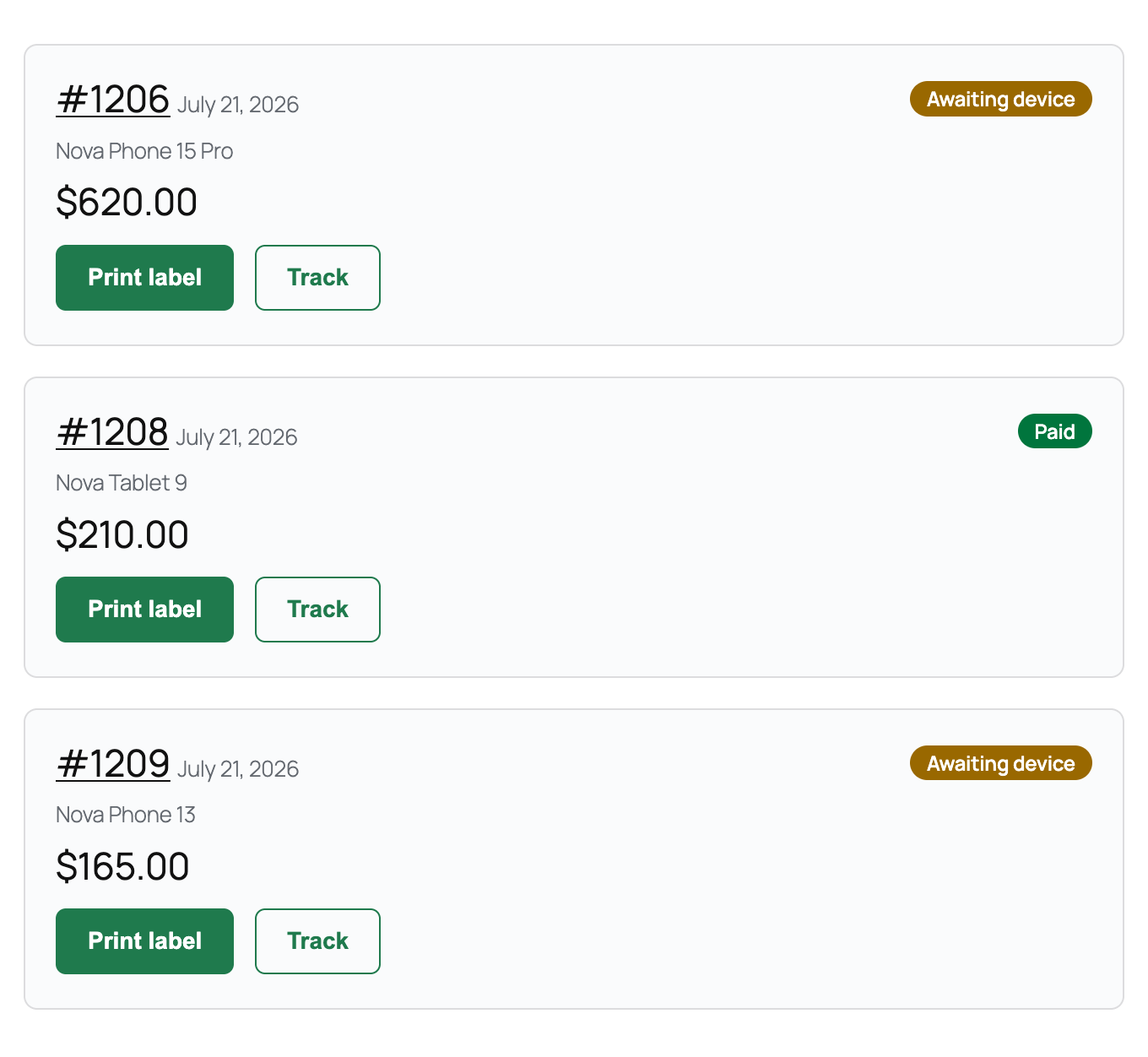
A dedicated tab under My Account gives every customer a card per trade-in: a plain-English status chip, the amount, and buttons to print the label or track the parcel. Pair it with the automatic email and SMS updates and the “any news?” inbox mostly disappears.

  • Status chips like “Kit on the way”, “Action needed: review offer”, “Paid”
  • Print label and Track, without contacting you
  • Optional Twilio texts at label, delivery and payout
The My Trade-ins account tab showing three trade-in cards with status chips Awaiting device and Paid, payout amounts, and Print label and Track buttons
My Account → My Trade-ins, exactly as the customer sees it.
Features

Everything a buyback business needs

Reversed checkout, payouts, shipping and order management — all native to WooCommerce.

Reversed checkout

Add buyback payment methods that pay the customer instead of charging them — the heart of a trade-in business.

Three store modes

Run a pure buyback store, sell and buy back side by side, or let shoppers trade in toward a new purchase — one plugin, your call.

Automatic payouts

Send the actual money from WordPress through PayPal Payouts or Wise. Batch dozens at once, with sandbox mode and a CSV export for the books.

Every payout method

PayPal, check, Amazon gift card, Venmo, Zelle, Interac e-Transfer, bank transfer — plus store credit. Offer exactly the ones you want.

Store credit, automated

Pay out in store credit and Gyta drops a ready-to-use WooCommerce coupon in their inbox — add an optional bonus to bring folks back.

Condition quiz

Ask a few questions instead of building a variation per condition. Each answer moves the offer, and the customer sees the quote update live.

Capture device & IMEI

Collect condition, IMEI/serial and notes right on the product, cart or checkout — even in block checkout. Require IMEI when you need it.

Products & variations

Define products, categories, attributes and variations any way you want, with specific pricing per variation to maximize margin.

Catalog CSV import

Load an entire price list from a spreadsheet — one row per device and condition — instead of building products one at a time.

EasyPost shipping labels

Auto-generate prepaid labels across USPS, UPS, FedEx, DHL, Royal Mail, Canada Post and more.

Prepaid shipping kits

Mail customers an empty box with the label already in it. No printer, no packing run to the shops — much less drop-off friction.

QR drop-off codes

Issue a QR code with the label so customers can hand the parcel over at the counter. The printable label always stays available too.

Batch labels & scan forms

Generate labels in bulk and print a carrier scan form, so a whole day of intake goes out in one handover.

Re-quote with photos

Showed up with a cracked screen? Send a revised offer with up to six inspection photos, and let the customer approve or decline before any money moves.

Quote expiry

Honour a quoted price for a set number of days. The deadline is stamped on the order, shown to the customer, and enforced automatically.

Email & SMS updates

Automatic messages at label, delivery and payout — by email, and by text through your own Twilio account.

My Trade-ins tab

A tab in My Account with a card per trade-in: status chip, amount, print label and track. Way fewer “where’s my payment?” emails.

Payout, backlog & margin reports

WooCommerce counts payouts as revenue. The Reports tab shows what you’ve paid, what you owe, what’s in the queue — and your resale margin.

Design & branding

Timeline, approval buttons, credit summary and QR panel all share one small design system you can restyle to match your theme.

Webhooks

Hook buyback events into your own automations, analytics or fulfillment tooling.

Self-hosted & private

Your data stays on your server. No external SaaS dependency for the core buyback function.

Use cases

Built for every kind of trade-in program

Phone & tablet buyback

Buy back used phones, tablets and wearables with condition-based pricing.

Laptop & electronics trade-in

Run a trade-in program for laptops, consoles, cameras and accessories.

Retail shops: sell + trade-in

Sell new gear and accept trade-ins side by side, or let shoppers trade in toward an upgrade right at checkout.

Recycling & ITAD

Give devices a second life with a self-guided, environmentally friendly take-back flow.

Self-hosted & developer-friendly

Runs inside your WordPress. No SaaS, no lock-in.

Gyta extends WooCommerce — it doesn’t replace it. Everything lives on your server, so you keep full control of your data, your theme and your stack.

  • Your business data stays on your own server — no backdoors, no phone-home
  • The only outbound calls are the integrations you enable: EasyPost, PayPal or Wise, Twilio
  • Native WooCommerce orders, products, variations & attributes
  • Classic and block checkout supported — trade-in state is validated server-side, never trusted from the browser
  • Payout credentials are stored on your server and every send is written to the order
  • Webhooks to plug buyback events into your own automations
  • Works with any WooCommerce-compatible theme — keep your stack
// reversed checkout — the store pays the customer
payouts.send(['paypal', 'wise']); // batched, from wp-admin
easypost.labels = 'auto'; // + QR drop-off · kits
quote.fromQuiz(); // price once, ask questions
quote.expiresInDays = 14;
on('buyback.received', inspectAndPay);
Pricing

Simple pricing that grows with you

Start free, or unlock the dual & upgrade store modes, store credit, and priority support. Annual plans get 2 months free.

Free

Try the free version

$ 0
  • Available free on WordPress.org
  • Multiple buyback payout methods (PayPal, Amazon Gift Card, Check)
  • EasyPost integration for automatic shipping labels
  • Full documentation & setup guide
  • Free support forum
Download free
Most popular

Pro

All features + priority support

$ 199 /year
  • Everything in Free, plus:
  • Dual & Net Settlement store modes, with automatic reconciliation after inspection
  • Automatic payouts via PayPal or Wise, more payout methods & store credit with a bonus
  • Condition quiz quoting, quote expiry & catalog CSV import
  • Shipping kits, QR drop-off, batch labels & scan forms
  • Re-quote with inspection photos, My Trade-ins tab, email & SMS updates
  • Payout, backlog & resale margin reports
  • Priority support (max 24hr response, Mon–Fri)
Buy Pro or start the 30-day free trial

Business

Premium business support

$ 899 /year
  • Everything in Pro, plus:
  • One-time minor customization
  • Expert WooCommerce store analysis + 1hr consultation
  • Premium business support (max 12hr response, 24/7/365)
Buy Business
100% satisfaction guarantee 100% Satisfaction Guarantee — not happy? Contact support for a refund within 7 days of purchase.
From the founder
Brandon Ernst

“I love the Gyta BuyBack plugin because it serves a really cool niche in WooCommerce — there’s nothing quite like it out there. We offer a 30-day free trial and a free version so anyone can get started at no cost and zero risk, plus a 7-day money-back guarantee. We stand by the plugin and are always happy to help.”

Brandon Ernst · Founder, Gyta BuyBack
FAQ

Questions, answered

Can I sell new products and accept trade-ins on the same store?+

Yep! Dual mode lets each product be sell-only, trade-in-only, or both — with separate carts so a purchase and a trade-in never get mixed up.

Can customers trade in toward a new purchase?+

Absolutely — that’s Net Settlement mode. Shoppers add a new item, pick a device to trade in, and its value comes off as instant credit. They just pay the difference (the Apple/Samsung-style upgrade flow).

Can I set up any kind of product?+

Yes! You can define your products, categories, attributes, variations, etc., any way you want.

What if I need unique pricing for product variations?+

No problem! You can set your variations and product attributes any way you want in WooCommerce, with specific pricing per variation.

Which payment methods are supported?+

All the major buyback payout methods — PayPal, check, Venmo, Zelle, Interac e-Transfer and bank transfer — plus automatic store credit. You choose which ones you offer.

Can Gyta actually send the money, or just record it?+

It sends it. Connect PayPal Payouts or Wise and the orders that are ready to be paid collect in a queue — tick them, hit send, and the money leaves. There’s a sandbox mode so you can rehearse the whole thing first, and a CSV export for your bookkeeper.

Do I have to build a product variation for every condition?+

Not any more. The condition quiz lets you price a device once, as if it were flawless, then ask a few questions — power, screen, battery, body, whatever you like. Each answer adjusts the offer and the customer watches the quote update live.

What if my customer doesn’t have a printer?+

Two options. Turn on QR drop-off and they show a code at the carrier counter instead of printing anything. Or send a shipping kit — your store mails them the box with the label already in it, and buys the device label when you mark the kit sent.

How long is a quote good for?+

However long you say. Quote expiry stamps a deadline on every trade-in order the moment it’s placed, shows it to the customer, and enforces it automatically — so a device that turns up three months later isn’t your problem.

Can customers get text updates?+

Yes — connect your own Twilio account and Gyta texts them when the label is ready, when the device arrives, and when the payout goes out. Emails cover the same moments if you’d rather not add SMS.

Can I import my price list instead of building products by hand?+

You can. Catalog CSV import takes one row per device and condition, so a few hundred models is a spreadsheet upload rather than a week of clicking.

Can I pay people in store credit?+

You can — Gyta can automatically issue a single-use WooCommerce coupon when a trade-in wraps up, and you can add a bonus percentage to encourage folks to spend it with you.

What if a device arrives in worse shape than described?+

Just send a revised offer after you inspect it. The customer approves or declines the new amount before any payout goes out — no awkward back-and-forth.

How are orders handled?+

Gyta BuyBack extends WooCommerce, the most popular cart software for WordPress. Your buyback orders show up in the WordPress admin screen, and you manage them there.

How are products shipped?+

Gyta integrates with EasyPost. You can set up EasyPost to use USPS, UPS, FedEx, DHL, Royal Mail, Canada Post and a whole array of other carriers.

Does it work with the new WooCommerce block checkout?+

It does! Device capture and the trade-in-toward-purchase selector both work in block checkout as well as classic checkout.

Can I change the look and feel?+

Absolutely. Gyta works within WooCommerce and WordPress, which are highly customizable. Many changes you can make yourself, pick from thousands of themes, or bring your own designer.

What themes can I use?+

Any theme! We suggest one developed for WooCommerce, but that’s not a requirement.

Ready to start buying back?

Launch a trade-in and buyback program on your WooCommerce store today — free version and a 30-day trial, no risk.